Racknerd 使用 Debian 9/10/11/12 内存占用有区别吗
测试套餐
都是在后台面板重装系统后查看内存和磁盘使用情况.
-
还有其它套餐选择
RackNerd 5T流量 35G存储 2GB内存 2核CPU 年付 $17.66 (LADC02机房)
https://my.racknerd.com/aff.php?aff=1374&pid=918
Debian11
内存
root@rn-sj:~# free
               total        used        free      shared  buff/cache   available
Mem:          999820       47204      869424        1924       83192      838772
Swap:        1048572           0     1048572
磁盘
root@rn-sj:~# df -h
Filesystem      Size  Used Avail Use% Mounted on
udev            473M     0  473M   0% /dev
tmpfs            98M  388K   98M   1% /run
/dev/vda1        16G  1.3G   14G   9% /
tmpfs           489M     0  489M   0% /dev/shm
tmpfs           5.0M     0  5.0M   0% /run/lock
tmpfs            98M     0   98M   0% /run/user/0
Debian10
内存
root@racknerd-c4039a:~# free
              total        used        free      shared  buff/cache   available
Mem:        1010876       45464      675584        5884      289828      820544
Swap:       1048572           0     1048572
磁盘
root@racknerd-c4039a:~# df -h
Filesystem      Size  Used Avail Use% Mounted on
udev            480M     0  480M   0% /dev
tmpfs            99M  7.0M   92M   8% /run
/dev/vda1        16G 1007M   14G   7% /
tmpfs           494M     0  494M   0% /dev/shm
tmpfs           5.0M     0  5.0M   0% /run/lock
tmpfs           494M     0  494M   0% /sys/fs/cgroup
tmpfs            99M     0   99M   0% /run/user/0
Debian9
内存
root@racknerd-c4039a:~# free
              total        used        free      shared  buff/cache   available
Mem:        1020356       33384      932756        3208       54216      886832
Swap:       1048572           0     1048572
磁盘
root@racknerd-c4039a:~# df -h
Filesystem      Size  Used Avail Use% Mounted on
udev            488M     0  488M   0% /dev
tmpfs           100M  3.2M   97M   4% /run
/dev/vda1        16G  859M   15G   6% /
tmpfs           499M     0  499M   0% /dev/shm
tmpfs           5.0M     0  5.0M   0% /run/lock
tmpfs           499M     0  499M   0% /sys/fs/cgroup
tmpfs           100M     0  100M   0% /run/user/0
Debian11的使用情况
在Debian11系统上安装caddy, v2ray, xray, aria2. 装完后仅运行的内存占用
root@rn-sj:~# free
               total        used        free      shared  buff/cache   available
Mem:          999820      159672      636168        1972      203980      703276
Swap:        1048572           0     1048572
用到的脚本:
bash <(curl -L https://github.com/crazypeace/v2ray_wss/raw/main/install.sh) 你的域名 auto
bash <(curl -L https://github.com/crazypeace/xray-vless-reality/raw/main/install.sh) auto 8443
bash <(curl -L git.io/ccaasudo.sh)
naive也可以搭, 相当于替换了一个caddy, 对内存没什么影响
bash <(curl -L https://github.com/crazypeace/naive/raw/main/install.sh) 你的naive域名 auto 14443
Debian12的使用情况
在Debian12系统上安装caddy, v2ray, xray, hysteria2. 装完后仅运行的内存占用
root@crazypeace:~# free
               total        used        free      shared  buff/cache   available
Mem:          984080      335400      179520        1992      619420      648680
Swap:        1048572           0     1048572
用到的脚本:
bash <(curl -L https://github.com/crazypeace/v2ray_wss/raw/main/install.sh) 你的域名 auto
bash <(curl -L https://github.com/crazypeace/xray-vless-reality/raw/main/install.sh) auto 8443
bash <(curl -L https://github.com/crazypeace/hy2/raw/main/install.sh) auto 2096
结论
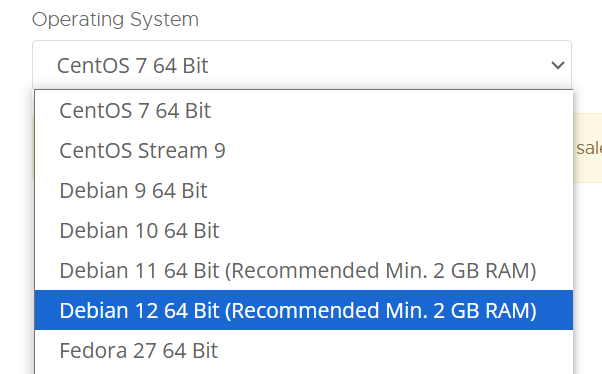
如果只是搭个梯子的话, 不用管那个提示 Debian 12 64 bit (Recommended Min. 2 GB of RAM)

 博文
博文


